
Skip to content
RET Consulting
EN FR
Contact me
RET Studio · iOS app

dueday. Your recurring costs, made clear.

Subscriptions, rent, energy, insurance: dueday gathers them on one readable screen and warns you before each due date. You know exactly what you pay, and when.
  • Complete privacy 100% offline: nothing leaves your device, no data collected, ever.
  • No account No signup, no email. Open the app and start.
  • Free, no limits Every core feature, free and with no time limit.
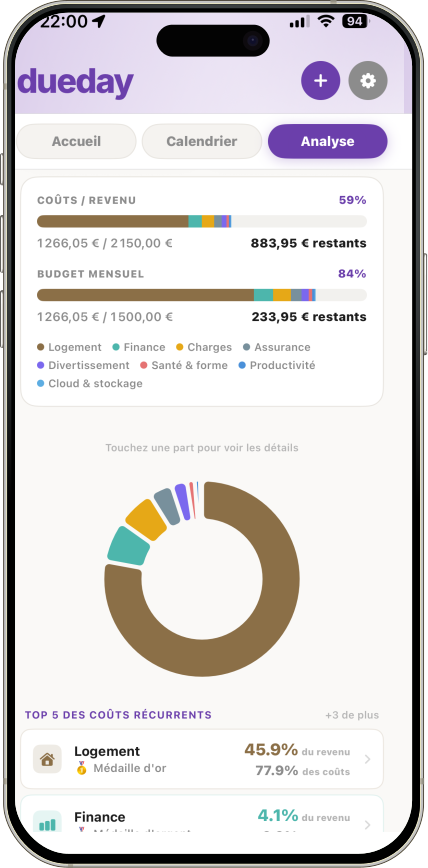
The dueday app running on an iPhone: costs against income, the monthly budget, a category breakdown and the top recurring costs.
The screens

Four views, everything's there.

A dueday tile showing the total of every recurring cost for the month, with the number of costs and categories beneath it.
Summary

The monthly total

Every recurring cost added up, and how many of them there are.

A dueday cost card for a Netflix subscription: its category tag, its price per month, and the day it next falls due.
Your costs

One card per cost

Tagged by category, priced per period, counting down to its date.

Three weeks of the dueday calendar, each due date marked on its day by the category icon of the cost it belongs to, with today highlighted.
Calendar

Every payment on its day

Pinned to its own day, with two quiet reminders: the day before, and the day itself.

A dueday analytics tile: the share of income taken by all recurring costs, as a percentage above the two amounts it compares.
Analytics

Costs against income

What the costs take out of your income, and out of the budget you set.

Practical

The fact sheet.

What the app runs on, what happens to your data, and what it does once it is on your phone.

The app

Platform Native on iPhone, released on the App Store. iOS
Price Every core feature, with no time limit. Free
Languages Interface in French and in English. FR · EN
Widgets Home screen in three sizes, and the lock screen. Home + lock

Your data

Storage Everything stays on the device. No server, no account. On-device
Collection Nothing gathered, nothing sent, nothing shared. None
Backup Export and import a file, kept wherever you choose. JSON
Erasure Removing everything takes one button. One button

Day to day

Reminders Two per due date: the day before, and the day itself. D-1 · D-day
Sorting By due date, amount, name or category. 4 ways
Targets Set an income and a monthly budget, then see what the costs take. Budget · Income
Themes Four colour themes, plus alternative app icons. 4
dueday · iOS

Your recurring costs, made clear.

100% offline, no account, free. Now on the App Store.

  • Free, no time limit on core features
  • 100% offline, nothing leaves your device
  • No account needed, ever

Available now on the App Store, Belgium.